
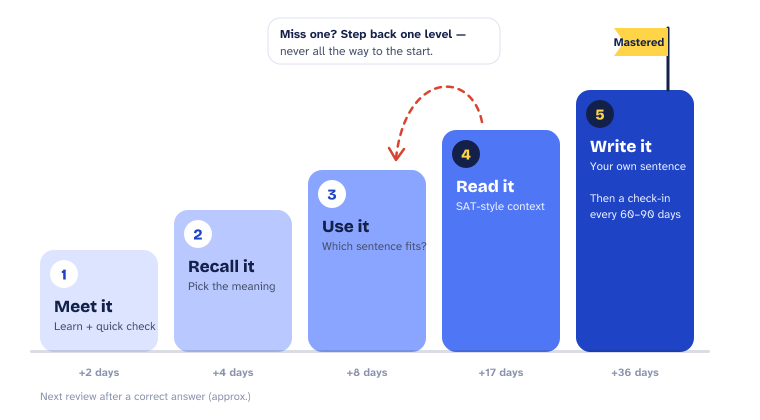
- Meet it: learn the word, its meaning and an example, then a quick check.
- Recall it: pick the right meaning with no hints.
- Use it: choose the sentence that uses the word correctly.
- Read it in context: an SAT-style Words in Context question.
- Write it: your own original sentence. You can't fake a sentence.
How it works
Five words. Then your phone.
-
1. A parent chooses the apps
Pick the apps that eat up the most time: Snapchat, TikTok, Instagram, YouTube, games, whatever it is in your house. They stay behind the shield until today's session is complete. You also set when the unlock ends each day.
-
2. Your student does today’s session
5–10 words, about five minutes. See a word. Learn it. Prove it. Then, once it’s earned, write an original sentence to master it, picking up SAT strategy the whole way.
Sessions put reviews first: words that are due come back before new words are added. That’s what makes words stick instead of fading after a week.
-
3. The apps unlock
Finish the session and the apps unlock until the time you set. The shield comes back on by itself, so there’s nothing to remember and nothing to argue about.
-
4. Progress adds up, visibly
Words mastered, streak and accuracy trend. You can see it’s working without asking “did you do your vocab?”
Designed so it doesn't feel like punishment
Teens can wear parents down until an app gets deleted. So we designed SATShield to be fair and fast.
-
Short on purpose.
A session takes about five minutes. Finishing should always be easier than finding a workaround.
-
Step away, get a new word.
Leave mid-word and you’ll come back to a different one. Nothing is lost: same session, same progress. The answer isn’t waiting in another tab.
-
No signal, no problem.
Everything needed for a session is on the phone, so it works without a signal. Offline sessions still earn a short unlock.
-
Quiz out.
Already know a word? Prove it and move on. Nobody should be held hostage over a word they’ve already mastered.
What students see in the app
- Word bank: all 300 words, with definitions, example sentences and mastery status.
- Mistakes log and stats: every miss recorded, with accuracy by level. It’s one of the best study tools in the app.
- Strategy at a Glance: the core SAT strategies, the punctuation cues that signal a definition, and common trap answers, with a short why for each.
What parents control
- Which apps are gated
- When the unlock ends
- Daily workload
- Progress view: words mastered, streak and accuracy trend
The five levels every word climbs
Questions about setup
Which apps can I lock?
You choose. Most families gate the apps that take the most time, like social media, games and video apps. They stay locked until that day's session is complete, then unlock until the time you set.
Can my teen get around it?
SATShield is set up by a parent and designed so that finishing a five-minute session is easier than looking for a workaround. Sessions are short, fair and quick to finish, which removes most of the reason to fight it.
What happens if my student misses a day?
Nothing breaks. The apps simply stay locked until a session is done, and the student picks up right where they left off.
Does SATShield work without internet?
Yes. Everything needed for a session is on the phone, so students can complete a session with no signal and earn a short unlock.